


FOX Weather: Daily Forecasts
3.81.91K Reviews
App Specs
- Version
- Varies with Device
- Updated On
- License
- Free
- Downloads
- 1,000,000+
- Developer
- FOX News Network, LLC
- Categories
- Weather
- Platform
- Android, iOS
Screenshots

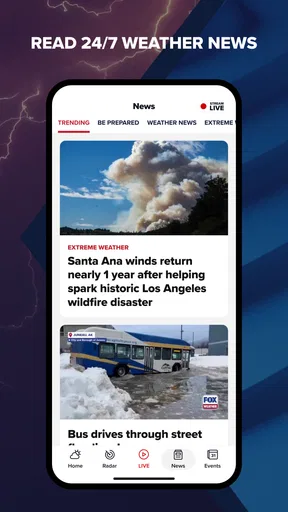
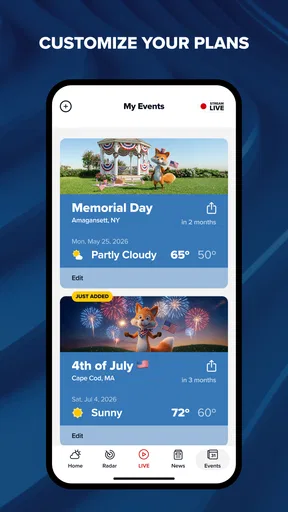
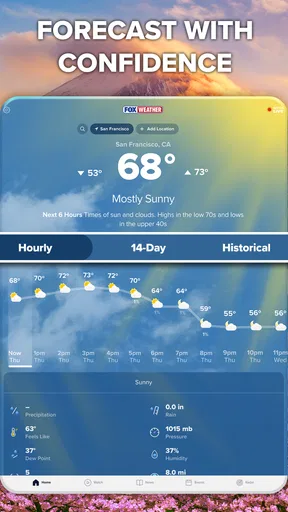
 Analysis by AppCompare
When I’m deciding whether to take a different route, move an outdoor plan indoors, or simply pack a rain jacket, a forecast is most useful when it helps me understand what is developing—not just what the sky looks like right now. That is the angle that makes FOX Weather: Daily Forecasts worth a look: it brings forecast information together with storm tracking and live news, giving weather a little more context than a temperature reading on its own.
I think of it as a weather app for people who want to follow changing conditions, especially when storms are part of the picture. It comes from FOX News Network, LLC, and it is free to install, with optional in-app purchases. The app is rated for Everyone. Its average rating is 3.8 from around 3.8 thousand ratings, and it has over a million installs. Those figures suggest it has found a substantial audience, though they do not tell you whether its style of coverage suits your own routine.
Following a forecast as conditions change
I find it helpful to treat a forecast as a starting point, then check again when the weather could change a plan. In this section, I’ll focus on how that habit makes the app’s mix of forecast views, storm tracking, and coverage more useful without turning every routine check into a weather watch.
Why the mix of forecasts, radar and coverage matters
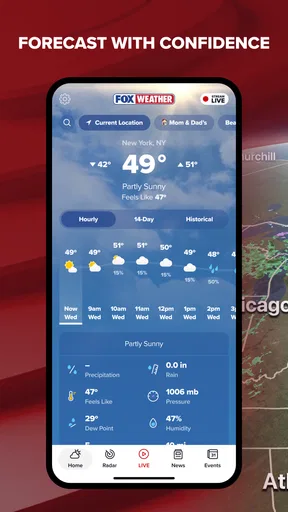
The central appeal, in my view, is being able to approach a weather question from more than one direction. An hourly or daily forecast helps with timing; radar maps give a visual sense of weather patterns; and video coverage can add explanation when a storm is making headlines. Those elements serve different needs, so the app is most useful when I treat them as complementary rather than expecting one screen to answer everything.
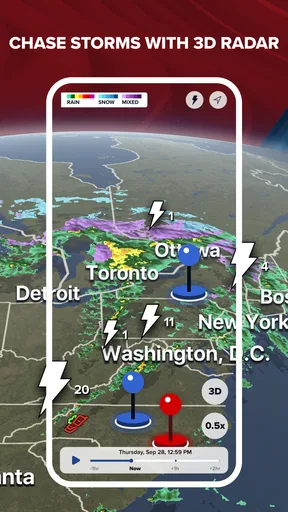
For a normal commute, a forecast may be enough to decide whether to bring a coat. If the weather looks unsettled, a radar view can help me see whether rain is near my area or elsewhere in the region. When the situation is more serious or fast-moving, live news and severe-weather alerts can add useful context. The practical advantage is having a path from “What should I expect?” to “What is happening nearby?” without relying on a single forecast panel.
That combination is particularly relevant for people who travel across town or have plans outdoors. A forecast for one location can feel incomplete if the day involves several stops, and regional radar can help make the broader picture easier to follow. I would still use local official guidance for urgent safety decisions, but the app can help me notice when it is time to pay closer attention.
How I would use it through an ordinary day
Imagine I have an outdoor appointment after work and the morning looks calm. I would check the hourly forecast first to see how the conditions may change around the time I need to leave. If rain or storms appear likely, I would look at the radar rather than assuming the whole day will be equally wet. Later, if alerts arrive or coverage points to a developing weather event, I could revisit the app before deciding whether to change plans.
Worth Reading Before You Choose

EA SPORTS FC Mobile 26 Is a Bigger Football Game, but It Takes Time

Flipboard Shows What News Apps Must Do Beyond the Feed

Switching to Android Auto Means Rethinking Your Driving Routine

Google Calendar Makes a Crowded Week Easier to Manage

Ludo King Makes the Most of the Minutes Between Plans

Baby Panda World Brings Quick Play to Modern Phones, but Its Game Library Feels Busy
That is a more useful workflow than checking the weather once and forgetting about it. The detail that matters is not simply whether rain is forecast, but whether the timing overlaps with a walk, a drive, or time spent outside. A sensible habit is to check again before a plan that depends on the weather, while treating any forecast as guidance rather than a promise. Conditions can shift, and a map or alert should not be read as a guarantee that a particular street or venue is safe.
Location access can make local information more convenient, while entering a place manually is a reasonable alternative if I prefer not to grant that permission. The app offers a guest option, which is useful for a quick first look without committing to an account. I would start with the simplest setup, then adjust location or notification choices to match how often I actually need updates.
Useful details without turning every check into a project
FOX Weather presents itself as a straightforward app rather than a complicated forecasting workstation. That matters when I only have a moment to check the day before leaving home. The forecasts are the quickest starting point; radar becomes more valuable when the broad outlook raises a specific question, such as whether a shower seems close enough to affect an errand.
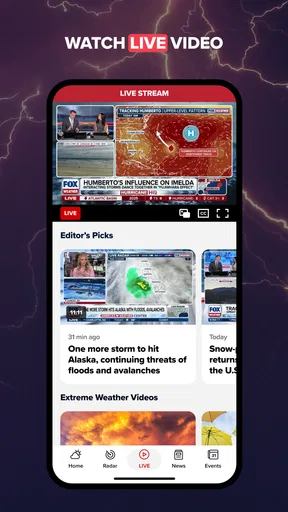
Video is a different kind of tool. I would not open a news segment every time I want to know the temperature, but it can be worthwhile when I want a clearer explanation of a weather event. In that sense, the app suits someone who sometimes wants to understand the story behind a forecast, not only glance at a number and close the screen.
Notifications are worth setting deliberately. If every update competes for attention, I am likely to ignore the alerts that matter. I would choose notifications around significant changes or severe weather rather than treating frequent updates as a substitute for checking conditions myself. That small bit of restraint makes alerts more useful and keeps a weather app from becoming background noise.
Where it fits beside other weather apps
Compared with a basic weather app that focuses on a compact forecast, this one puts more emphasis on radar, storm tracking and news coverage. That is a good trade if I want context and visual tools in the same place. It may feel like more than I need if all I want is a quick temperature check before getting dressed.
Some people prefer a dedicated radar service for close observation, or a local weather source when they want information tailored to a particular community. Others may value a quieter interface with fewer media elements. I would not call one approach universally better: the right choice depends on whether I want a quick answer, a closer look at approaching weather, or coverage that explains a developing situation. FOX Weather is strongest for the second and third needs, while a simpler alternative may be faster for the first.
One useful way to judge it is to ask what decision I make after opening it. If I regularly check storm movement, follow severe-weather developments, or plan around outdoor conditions, the added context has a purpose. If my weather checks rarely go beyond “Do I need an umbrella?”, a lighter app may be easier to live with. The app’s free entry point makes it easy to try that distinction in my own routine; optional purchases range from $1.99 to $12.99 per item, so I would review any purchase choice rather than assume every feature or service is included at no cost.
What to keep in mind when relying on alerts
Weather alerts are helpful prompts, not a replacement for judgement. I would read them as a reason to check the situation and make a plan, not as a guarantee that conditions will unfold in exactly the same way everywhere nearby. For travel, outdoor work, or a time-sensitive event, I would check again close to departure and use local instructions when safety is involved.
There is also a difference between seeing a storm on a regional map and knowing what it will do at a specific address. Radar can make patterns easier to understand, but interpreting those patterns takes care. If I need precise decisions for a narrow location, I would compare the app’s view with an appropriate local source rather than over-trusting a single screen.
The app’s news component is another consideration. It can be a plus when I want weather coverage alongside forecasts, but it may not suit someone who wants a strictly minimal utility. I would approach video as optional context: useful when the weather is significant, easy to skip when all I need is a quick check before heading out.
Who is most likely to get value from it?
I would recommend it most to people who make plans around changing weather and like to see more than a daily high and low. That includes commuters who cross different parts of a region, families coordinating outdoor activities, and anyone who wants alerts and storm coverage close at hand. It is also a sensible option for someone who enjoys a visual explanation of weather rather than relying only on short forecast text.
It is less compelling for someone who wants the smallest possible app experience, dislikes news content, or only checks the forecast occasionally. People who need highly specialized local information may also prefer a source focused on their exact area. Choosing another app in those cases is not a knock on this one; it is simply a better match for a narrower need.
FOX Weather: Daily Forecasts was released on October 21, 2021, and its combination of forecasts, radar, alerts and live coverage gives it a clear identity within the weather category. I would start with the forecast, use radar when timing or location matters, and keep alerts focused on changes that could affect my plans. That approach makes the app easier to use without asking it to replace local judgement.
Getting Started with FOX Weather
So, you download FOX Weather: Daily Forecasts, and the first thing you'll notice is its sleek and straightforward interface. It welcomes you with the option to either sign in or continue as a guest, which is great if you want to quickly jump into the weather updates without any hassle. I chose to dive right in and was greeted by a clean home screen featuring the current weather in my location.
The app also offers a smooth setup where it asks for location permissions. This is crucial because let's be honest, nobody enjoys manually entering their location every time they open a weather app. Once you're set up, it's all about the details, and FOX Weather doesn't skimp on those.
The Features You’ll Love
Alright, let’s talk features. One of the standout aspects of this app is its hourly and daily forecasts. I found it incredibly helpful to have a comprehensive view of the weather not just for today, but for the week ahead. This is particularly useful when planning outdoor activities or trips.
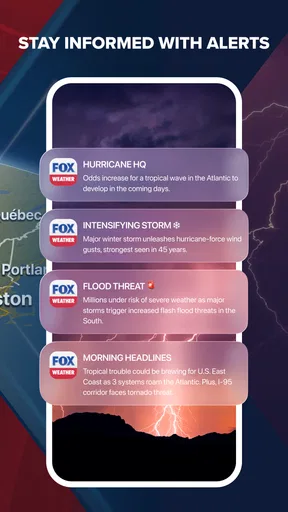
FOX Weather also provides severe weather alerts. This is a game-changer because it ensures you're always informed about any approaching storms or drastic weather changes. It's like having a weather expert whispering in your ear, "Hey, better bring that raincoat tomorrow."
- Radar Maps: The radar maps are highly detailed and interactive. You can zoom in and out, and even look at the weather patterns across different regions.
- Video Content: They have engaging video segments that offer deeper insights into weather phenomena, which I found quite educational.
- Customizable Notifications: You can tailor the notifications to suit your needs, whether you want updates every hour or just when there's a significant weather change.
User Experience and Design
In terms of user experience, FOX Weather gets a thumbs up from me. The navigation is intuitive, and everything is exactly where you’d expect it to be. The app is designed with the user in mind, minimizing the learning curve significantly. I was able to access the information I needed without getting lost in a maze of menus.
Visually, the app is pleasing with its use of colors and graphics. It manages to be informative without overwhelming you with too much information at once. The balance between visuals and data is spot on, making it easy to digest all the weather info you need.
Final Thoughts
All in all, FOX Weather: Daily Forecasts is a solid choice for anyone looking to keep their weather knowledge up to date. It's not just about telling you if it’s going to rain or shine; it’s about preparing you for what's ahead. The app’s reliability and user-friendly design make it a must-have, especially if you’re someone who likes to stay prepared for whatever Mother Nature throws your way.
Whether you're planning a weekend getaway or just trying to decide if you should carry an umbrella, FOX Weather is like having a personal meteorologist at your fingertips. So, if you haven't already, give it a download and see how it helps you navigate your daily plans with ease.
Pros
- User-friendly interface with intuitive navigation.
- High accuracy in weather predictions.
- Live streaming of weather news available.
- Customizable alerts for severe weather.
- Interactive radar with detailed maps.
Cons
- Occasional ads can interrupt user experience.
- Requires stable internet for live features.
- Limited widget customization options.
- Battery consumption can be high.
- Some features are region-specific.
FAQs for FOX Weather: Daily Forecasts
What features does FOX Weather: Daily Forecasts offer?
FOX Weather: Daily Forecasts provides real-time weather updates, including hourly and daily forecasts. The app also offers severe weather alerts, radar maps, and video content from FOX Weather correspondents. Users can personalize their experience by setting favorite locations and receiving tailored weather alerts.
Is FOX Weather: Daily Forecasts free to use?
Yes, FOX Weather: Daily Forecasts is free to download and use on both Android and iOS platforms. While the app offers a comprehensive suite of features at no cost, it may include advertisements. There are no in-app purchases or subscriptions required to access its core functionalities.
How accurate are the weather forecasts on FOX Weather?
FOX Weather uses advanced meteorological data and technology to provide accurate weather forecasts. The app sources information from trusted weather services and employs experienced meteorologists, ensuring users receive reliable and up-to-date information. However, like all weather apps, some variability in accuracy is possible.
Can I customize notifications in FOX Weather: Daily Forecasts?
Yes, users can customize notifications in FOX Weather: Daily Forecasts. The app allows you to set alerts for severe weather conditions and daily forecasts for specific locations. You can choose the type of notifications you want to receive and adjust settings to suit your preferences and needs.
Does FOX Weather: Daily Forecasts require an internet connection?
Yes, FOX Weather: Daily Forecasts requires an internet connection to provide real-time weather updates and alerts. While some data may be cached for offline viewing, an active internet connection ensures the most accurate and up-to-date information is accessible at all times.


